https://www.ultraedit.com/downloads/extras/wordfiles/
Wordfiles for Syntax Highlighting | UltraEdit and UEStudio
Download and add wordfiles to UltraEdit and UEStudio to highlight the source code of different languages. We have hundreds available, here.
www.ultraedit.com
기본적으로 ultraedit 사이트에서 제공해 주는 언어가 있고 그 외의 언어는 맞는 파일을 구해야 할 것 같습니다.
설정 방법
고급(Advanced) 탭 > 설정(Configuration) 메뉴 > 편집기 표시(Editor display) > 구문 강조(Syntax Highlighting)
해당 설정에 들어가면 단어파일의 전체 디렉토리이름 부분이 보일 것입니다.

위 사이트에서 다운로드한 파일을 해당 위치에 위치시키면 자동으로 등록되는 것을 확인할 수 있습니다.
등록은 UltraEdit을 한 번 껐다가 다시 키세요
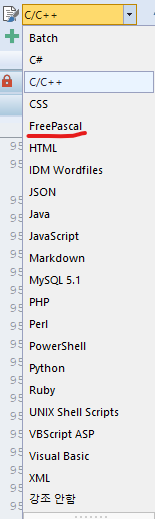
색상을 정하는 테마에서도 자동으로 등록되기 때문에 이후부터는 설정을 하고 사용하시면 됩니다.
'개발' 카테고리의 다른 글
| [Git] GitHub 웹 사이트에서 한 커밋 지우기 (0) | 2025.07.29 |
|---|---|
| [GitHub] readme.md 링크로 다른 창(탭)에서 열기 (0) | 2025.07.29 |
| [리뷰] 튜토리얼 헬에서 벗어나라 (8) | 2025.07.02 |
| [Git] 브랜치 제거하기 (0) | 2025.06.23 |
| [사이드 프로젝트] LIM (0) | 2025.05.25 |
